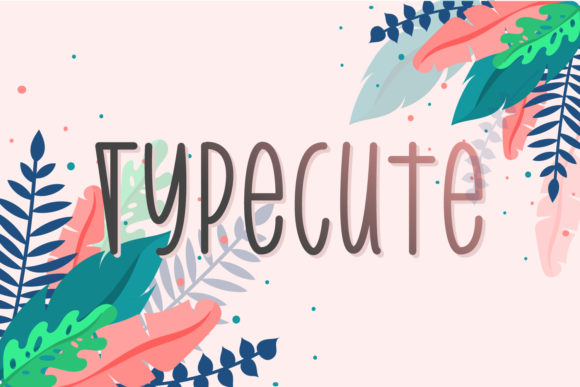
TypeCute: A Sweet Handwritten Font for Crafters and Makers
As I sat down to design a new line of seasonal candle labels for my Etsy shop, I knew I needed a font that would bring warmth and personality to the packaging. That’s when I discovered TypeCute—a script handwritten font that felt just like a personal note from a friend. Its soft curves and gentle bounce gave my labels a cozy, approachable look that perfectly matched the lavender-scented candles I was preparing.
TypeCute for Candle Labels and Product Packaging
One of the first things I tested was how TypeCute looked on candle labels. The font’s organic flow and slight irregularities made each label feel handmade, even though I was printing them in batches. I used it for both the scent name and the brand tagline, and it balanced beautifully with a clean sans serif font for the barcode area. Since TypeCute is a display font, it worked best for short phrases and titles rather than long descriptions, which is exactly what product labels need.
Creating Greeting Cards with TypeCute’s Friendly Style
I recently launched a set of minimalist greeting cards for birthdays and thank-you notes, and TypeCute became the star of the designs. I used it for the main message—like “You’re the Best” or “Thank You for Being You”—and paired it with a light watercolor background. The handwritten font brought a personal touch that customers loved. It’s perfect for anyone looking to create heartfelt, custom stationery without needing advanced design skills.
How TypeCute Enhances Planner Pages and Digital Printables
When I designed a set of weekly planner templates for digital download, I wanted a font that felt both functional and cheerful. TypeCute added a playful flair to the headers and section titles, making the planner feel more inviting. I made sure to keep the body text in a simple sans serif font to maintain readability, while using TypeCute as an accent. It’s a great example of how a script handwritten font can elevate digital printables without overwhelming the layout.
Wedding Invitations and Elegant Branding with TypeCute
A fellow designer in my crafting group asked me to help her revamp her wedding invitation templates. We chose TypeCute for the bride and groom’s names and the event date. The font’s softness and warmth gave the invitations a romantic, personal feel. Paired with a classic serif font for the body text, it created a balanced and elegant design that brides loved. If you’re creating a line of wedding stationery, TypeCute can help you build a memorable brand identity with a handmade touch.
Designing Stickers and Boutique Tags Using TypeCute
I tested TypeCute on a set of small vinyl stickers for planners and notebooks. Because the font is slightly bolder in some strokes than others, I made sure to adjust the spacing when cutting on my Cricut machine. It worked surprisingly well for small formats, especially when used for one or two words at a time. I also used it for boutique tags—those little cards that hang from clothing or gift bags. The result was a boutique-style look that felt both polished and personal.
TypeCute for Seasonal Crafts and Holiday Packaging
During the holiday season, I redesigned my gift tag and ornament tag collection using TypeCute. The font’s natural, flowing style worked beautifully for phrases like “To My Favorite Person” or “Handmade with Love.” I used it on red kraft paper tags with twine, and the contrast made the text stand out in a warm, inviting way. Whether it’s for Christmas, Valentine’s Day, or spring-themed items, TypeCute brings a seasonal charm that’s hard to match with other fonts.
Pairing TypeCute with Other Fonts for Visual Harmony
One thing I’ve learned as a maker is the importance of font pairing. When using TypeCute, I almost always pair it with a clean sans serif like Montserrat or a simple serif like Georgia. This creates a nice balance between the playful, handwritten font style and a more structured, professional look. If you’re creating digital templates or printable wall art, this combination helps guide the reader’s eye and improves overall design harmony.
Using TypeCute for Tote Bags, Mugs, and Merchandise
I recently added a line of custom tote bags and mugs to my shop, and TypeCute was the perfect fit. I used it for phrases like “Stay Cozy” on mugs and “Carry the Good Vibes” on tote bags. The font’s friendly style made each item feel more personal and intentional. I also checked the font’s licensing to ensure I could use it commercially, which is a must for any maker selling physical products or digital designs. The TypeCute package included multiple file formats and multilingual support, so I could confidently offer products to an international audience.
What to Look for When Using TypeCute in Real Projects
Before you dive into your next project, take a moment to explore what’s included in the TypeCute font package. Look for alternates, ligatures, and swashes that can give your text more variety and customization. I found that using the alternate letters helped me create unique looks for different products. Also, make sure the font is compatible with your design software—whether it’s Canva, Illustrator, or Silhouette Studio. Finally, test the font at different sizes, especially for small stickers or printed cards, to ensure legibility and clean cutting for machine-cut designs.